Providing convenient tipping options during checkout is a great way to appreciate your staff's hard work. The Tipping Settings feature gives you full control to design a gratuity structure that best fits your venue's culture. You can offer quick tip suggestions as Percentages (like 10% or 15%) or Fixed Amounts (like Rp 10,000). This system is designed to create a frictionless payment experience without making guests feel intimidated.
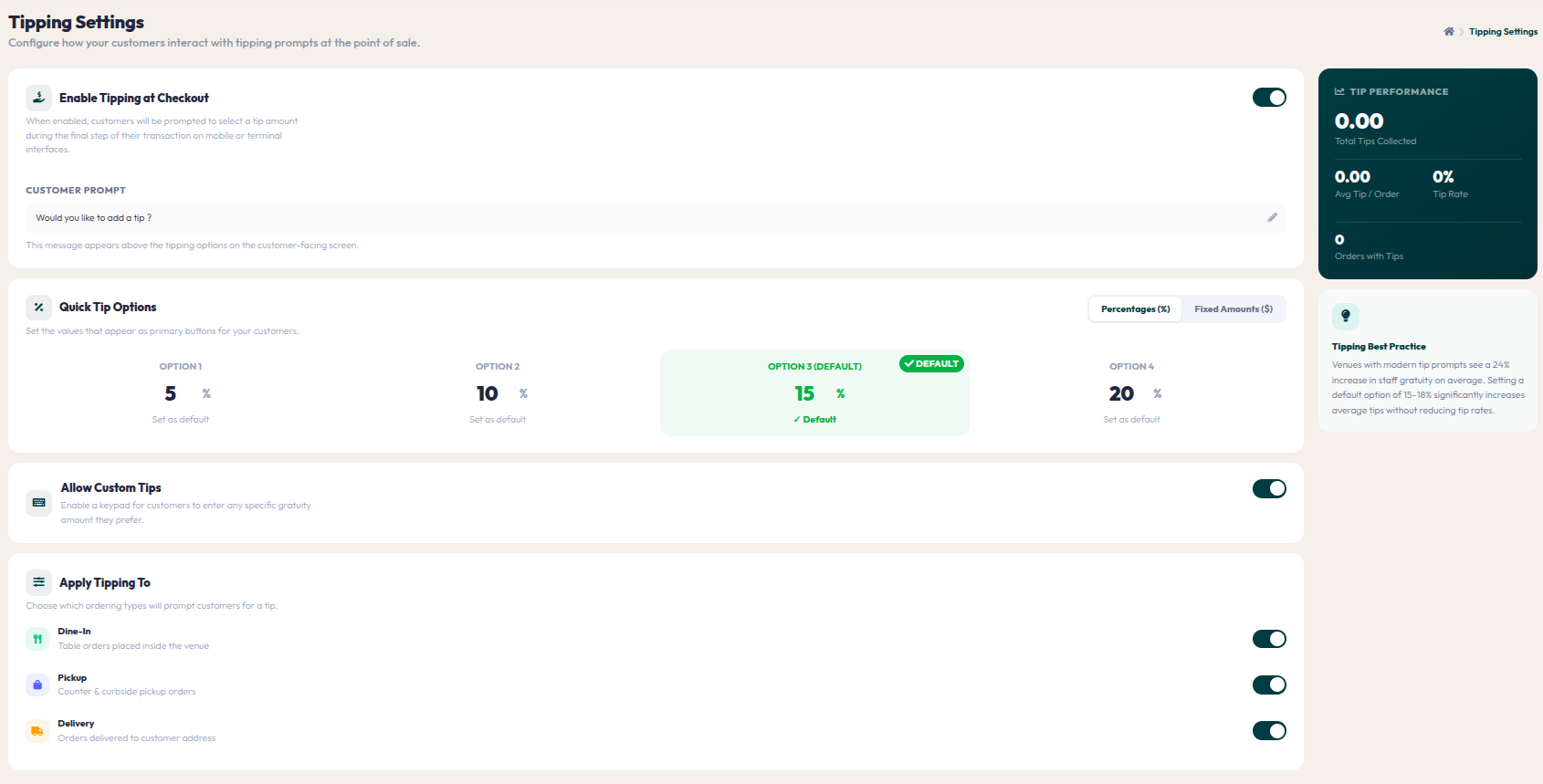
- Go to Orders > Tipping Settings.
- Toggle on Enable Tipping at Checkout to display the tipping option on the guest's screen.
- Set the recommended tip amounts in the Quick Tip Options section. Choose between Percentage (%) or Fixed Currency (Rp) calculation formats.
- Toggle on Allow Custom Tips if you want to give guests the freedom to manually enter a tip amount of their choosing.
- Select which service channels (Dine-In, Pickup, Delivery) will display this tip option using the toggles under the Apply Tipping To section.
Flexible tipping options reflect a positive culture of appreciation. With the right settings, you not only help staff earn extra income but also enhance their loyalty to your restaurant.